Stop Scrolling, Start Achieving: Align Your Online Time With Your Goals
Reclaim your focus, identify the digital time-wasters holding you back, and use Time Blocker to make sure your online habits actually serve your real-world ambitions.

You didn't plan to spend two hours online before lunch. It just happened. One feed, then a tab, then a "quick check" that wasn't quick. The real question isn't whether you spend too long online. It's whether that time points anywhere you actually care about.
Most advice here is a version of "try harder." This isn't. What follows is a plain process: see where your hours really go, find the two or three sites quietly eating them, and use Time Blocker to align your online time with your goals. No willpower heroics. Just honest data and a couple of decisions you only have to make once.
- Track before you change. You can't fix a habit you can't see.
- Target your top 2–3 distractions instead of trying to block everything.
- Schedule blocks around your real work hours, and leave your downtime alone.
- Review weekly. Alignment is a habit, not a one-time setup.
Step 1: Assess Your Current Online Habits vs. Your Goals
You can't change a habit you can't see, and most of us genuinely can't see this one. Ask someone to guess their daily screen time and they'll lowball it by hours, not minutes. So step one isn't blocking anything. It's looking, honestly, at where the time actually goes.
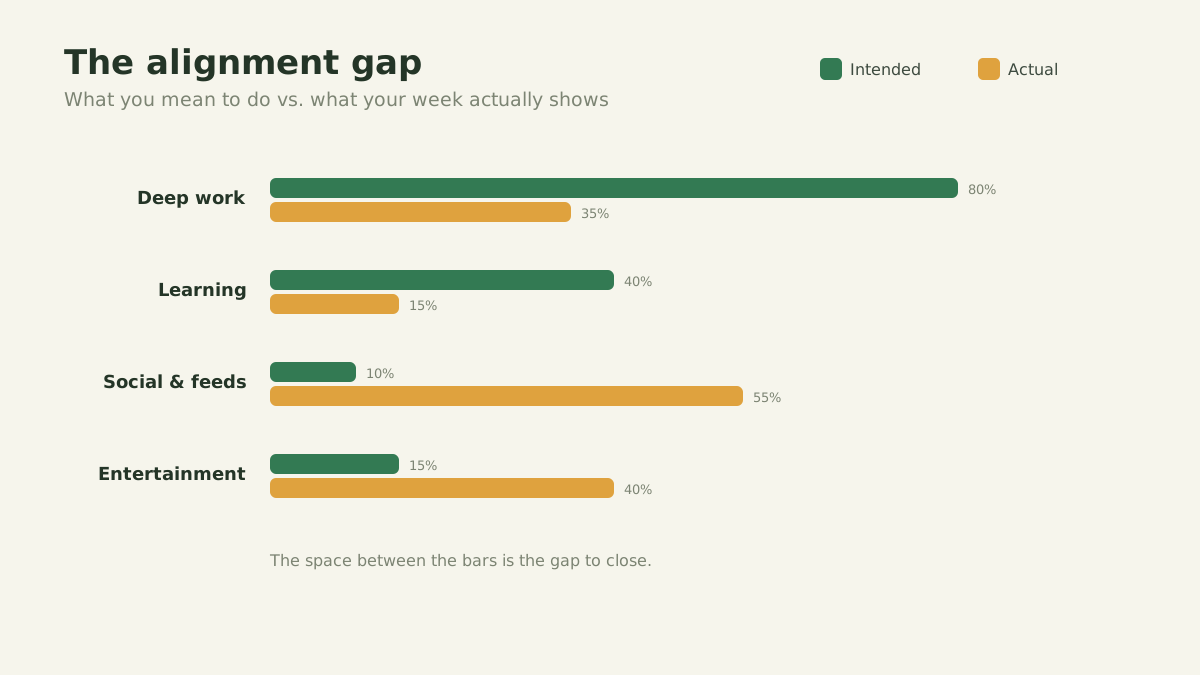
Define your goals
Start with what you're actually trying to do this month. "Be more productive" is too fuzzy to measure against. "Ship the redesign" or "read 30 minutes a night" isn't. A concrete goal gives you something to weigh your browsing against, which is the whole point of the exercise.
Track your time
Then stop guessing and measure. Time Blocker sits in the background and logs how long you spend on each site, day by day. Give it three or four days before you draw any conclusions. None of it leaves your browser, which is a deliberate choice we explain on our privacy page.
Compare and reflect
Now hold the two up against each other. Does where your time actually went match what you said mattered? There's almost always a gap, and it tends to be wider than you'd like to admit. That gap is your to-do list for everything below.
Every hour you spend online is a vote for the person you're trying to become.The core idea behind intentional browsing
Step 2: Identify and Eliminate Time-Wasters
With a few days of data in hand, the culprits stop being a mystery. Two or three sites usually account for most of the damage, and they're rarely the ones you'd have named from memory. Those are what you go after, and going after them is exactly what Time Blocker is for. (Still picking a tool? Compare the best website blockers on cost and privacy first.)
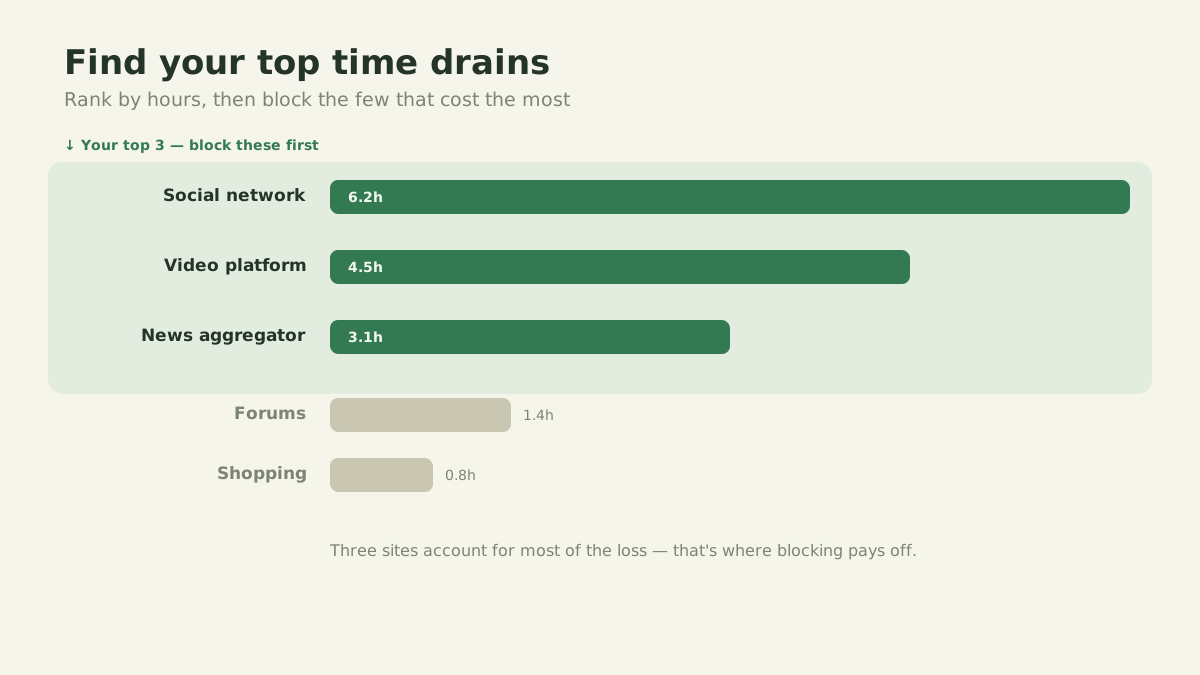
Pinpoint the culprits
Your data from Step 1 does the work here. Maybe it's an hour a day disappearing into one feed. Maybe it's a news site you reopen five times before lunch without ever deciding to. Pick the worst two or three and leave everything else alone for now.
Put structure in place
Willpower is the wrong tool for this job. Structure is the right one:
Schedule blocking. Pick your core work hours once, then have the worst sites blocked automatically during them. A decision you made on Sunday can't be argued with on Wednesday.
Block the whole domain. Time Blocker blocks at the root-domain level, so closing a site shuts all of it, not the one page you'll just navigate around.
Make blocked the default. Keep your worst offenders shut through the workday and open them on purpose when you genuinely need them. Opening a door beats fighting one that's always ajar.
Refine and adjust
Then watch what happens over the next week or two. Getting more done? Reaching for the tab less often? Adjust from there. Add a site that slipped through, loosen a window that turned out too strict, and keep tuning until the setup fits how you actually work instead of how you wish you did.
Put this into practice in 3 minutes
Time Blocker tracks where your hours go and blocks the sites that steal them, free and entirely in your browser.
Step 3: Stay Consistent and Focused
Setting this up costs you an afternoon. Keeping it going is the harder part, and it's where most people quietly slide back. A few small habits keep it from unraveling:
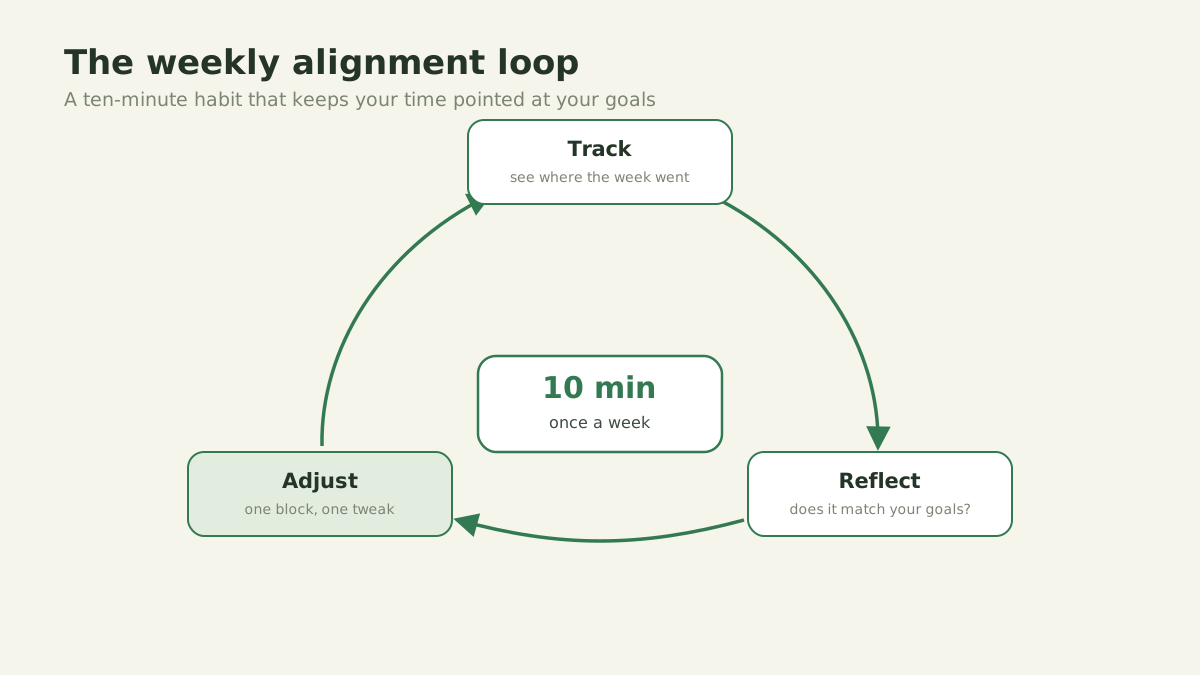
- 01Regular review. Glance at your Time Blocker reports now and then to make sure you haven't drifted off track.
- 02Mindful browsing. Before you click the tempting link, ask whether it has anything to do with what you sat down to do.
- 03Celebrate wins. Notice the time you claw back, because noticing is half of what makes the habit stick.
- 04Use downtime wisely. Take real breaks, just take them on purpose, so they don't quietly turn back into the old trap.
Alignment is a practice, not a switch
You don't align your time once and then coast. You keep nudging it: a bit of tracking, the occasional new block, a quick look each week. Do that for a while and your browser slowly stops being the thing that eats your day and starts being something that serves it.
Frequently asked questions
The questions people ask most about aligning their time online.
Is my time spent online aligned with my goals?+
How do I identify and eliminate the time-wasters holding me back?+
Does Time Blocker store my browsing data anywhere?+
Time Blocker
Helping you focus on what matters most by managing your digital time effectively. Free, private, and right in your browser.
Ready to take your time back?
Add Time Blocker to Chrome for free. No account, and your data stays where it belongs, with you. Pair it with focus sounds for an even deeper work session.
Add to Chrome for free